딕셔너리

-딕셔너리 타입을 가지고 있는 파이썬과 다르게, 스위프트 딕셔너리는 대괄호 [ ]안에 작성한다. 이는 스위프트 Set도 마찬가지다.
⌘The type of a Swift dictionary is written in full as Dictionary<Key, Value>
-값을 포함한 채로 선언. Dictionary< , > 꺽쇠괄호 안에 키와 벨류 타입은 콤마로 구분함에 주의!
-딕셔너리는 순서가 없다.
-Value에는 Any타입을 사용할 수 있지만, Key에는 Any타입을 사용할 수 없다.
# 0Creating a Dictionary with a Dictionary Literal

# 1Creating an Empty Dictionary
-빈 딕셔너리 선언
-Array와 같이 총 7개
-Array는 [] Dictionary는 [:]
var sampleDict: Dictionary<String, Int> = Dictionary<String, Int>()
var sampleDict: Dictionary<String, Int> = [String: Int]()
var sampleDict: Dictionary<String, Int> = [:]
var sampleDict: [String: Int] = [String: Int]()
var sampleDict: [String: Int] = Dictionary<String, Int>()
var sampleDict: [String: Int] = [:]
var sampleDict = [String: Int]()
-앞에는 Dictionary<type,type> 와 [type:type]. 뒤에는 Dictionary<type, type>(), [type:type](), [:]. 앞에 2개와 뒤의 3개 조합.
그리고 제일 간략한 = [type: type]()신택스 1개. 총 7개.
# 2Accessing and Modifying a Dictionary

⌘As with an array, you find out the number of items in a Dictionary by checking its read-only count property
⌘Use the Boolean isEmpty property as a shortcut for checking whether the count property is equal to
->딕셔너리도 컬렉션 타입임으로, count프로퍼티 와 isEmpty 프로퍼티 사용가능
-새로운 키값으로 새로운 키:벨류 쌍을 추가 시킬 수 있으며, 원래 있던 키값으로 벨류 값을 변경 시킬 수 있음
-키값으로 벨류값에 접근해보면, 벨류값의 타입은 Optional이다. 그래서 벨류를 추출해 사용하려면 옵셔널 바인딩이나 강제추출을 사용한다.
# 2추가 딕셔너리의 updateValue메소드

-키값을 통해 벨류를 변경하는 또다른 방법.
-만약 키값이 없다면, 키:벨류 쌍을 추가한다. 그리고 nil을 반환한다.
-updateValue메소드는 키값을 통해 벨류값을 업데이트하고 이전 벨류값을 옵셔널로 반환한다.
--> 따라서 이 메소드를 사용하면 새로운 쌍을 추가했는지, 아니면 딕셔너리를 업데이트 했는지 알 수 있다.
⌘use a dictionary’s updateValue(_:forKey:) method to set or update the value for a particular key. Like the subscript examples above, the updateValue(_:forKey:) method sets a value for a key if none exists, or updates the value if that key already exists. Unlike a subscript, however, the updateValue(_:forKey:) method returns the old value after performing an update. This enables you to check whether or not an update took place.
The updateValue(_:forKey:) method returns an optional value of the dictionary’s value type. For a dictionary that stores String values, for example, the method returns a value of type String?, or “optional String”. This optional value contains the old value for that key if one existed before the update, or nil if no value existed
딕셔너리의 벨류는 옵셔널 상태라는 것이 중요!
#2 추가 딕셔너리 요소삭제

-두가지 방법이 있다.
-첫 째 키값을 통해 벨류를 nil로 업데이트. 없는 키값이라면 아무일도 발생하지 않음.
-두번 째 removeValue사용. 이 방법은 삭제된 벨류값을 반환받는다. 당연히 반환값은 옵셔널!. 만약 키값이 없다면 nil을 반환.
removeValue나 updateValue는 없는 키값이라면 nil을 반환 있는 키값이라면 옵셔널을 반환. 즉 뭐라도 반환 한다고 보면 됨.
#3Iterating Over a Dictionary
⌘You can iterate over the key-value pairs in a dictionary with a for-in loop. Each item in the dictionary is returned as a (key, value) tuple, and you can decompose the tuple’s members into temporary constants or variables as part of the iteration
-> 키-벨류 쌍을 반복할 수 있다 딕셔너리를 for루프 안에 넣음으로써. 딕셔너리의 각각의 아이템은 (키, 벨류) 튜플로 전달 된다. 그리고 튜플의 각각의 요소들을 분해하여 일시적으로 반복문 안에서 상수나 변수로 사용할 수 있다.
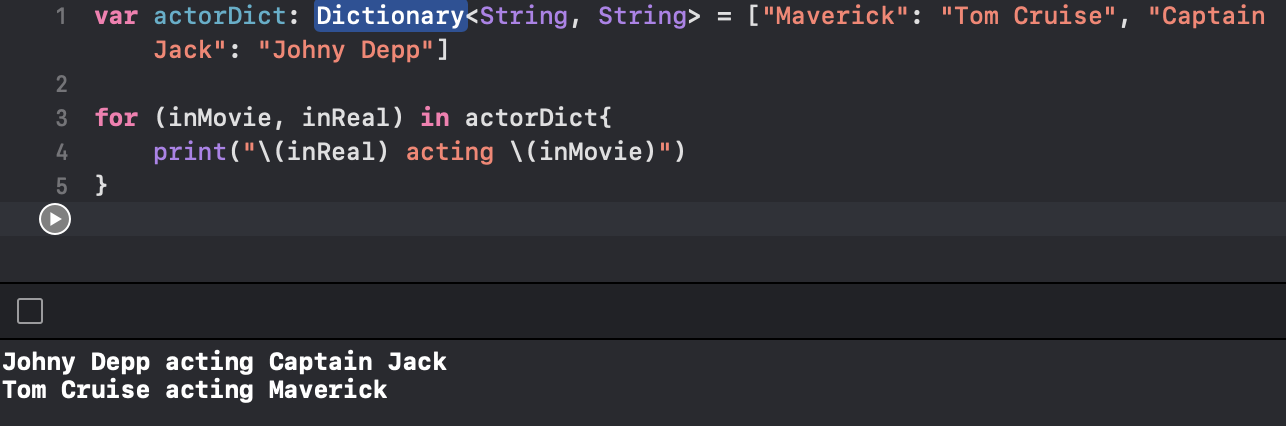

-.keys 나 .values를 통해 키 혹은 벨류 값들만 사용할 수도 있다.
참고로 keys와 values 프로퍼티로 가져온 것은 배열이 아니라, Ditionary<타입, 타입>.keys라는 타입이다. 이는 파이썬처럼 마찬가지로 keys와 values로 가져온 것의 타입이 리스트가 아닌것과 같다. 그렇기 때문에 [새로 만들 배열의 타입]으로 변환해주어야한다.
# 3 추가 키/벨류값들 Array로 만들기
⌘If you need to use a dictionary’s keys or values with an API that takes an Array instance, initialize a new array with the keys or values property
만약 어레이 객체를 받는 API에 키값들이나 혹은 벨류값들을 전달해야 한다면, 새로운 Array를 키 또는 벨류 프로퍼티로 초기화 하면된다.

' IOS,Swift > Swift⌘' 카테고리의 다른 글
| Swift - Optional Chaining (0) | 2022.07.02 |
|---|---|
| Swift - Optional (0) | 2022.07.01 |
| Swift - Enumeration (0) | 2022.06.30 |
| Swift - Collection Type1 Array (0) | 2022.06.28 |
| Swift - Declaring Constants(let) & Variables(var) (0) | 2022.06.26 |


