
옵셔널은 열거형으로 구현되어있음.
⌘You use optionals in situations where a value may be absent. An optional represents two possibilities: Either there is a value, and you can unwrap the optional to access that value, or there isn’t a value at all
-> 옵셔널은 값이 없을 수도 있는 상황에 사용함. 하나의 옵셔널은 2가지 가능성을 내포하고 있다: 값이 있을 수도 없을 수도. 값이 있다면 값에 접근하기 위해 옵셔널을 unwrap 할 수도 있다.
⌘Because the initializer might fail, it returns an optional Int, rather than an Int. An optional Int is written as Int?, not Int. The question mark indicates that the value it contains is optional, meaning that it might contain some Int value, or it might contain no value at all
-> 이니셜라이저가 형변환에 실패할 수도 있기 때문에, 옵셔널 정수형으로 반환한다. 물음표 기호는 이것이 옵셔널을 내포하고 있다는 의미이며, 값이 없을 수도 있을 수도 있다는 것을 의미함.

# + 형변환과 옵셔널
-> 형변환의 타입은 옵셔널로 반환됨. "36.5c"를 Int로 형변환 하였다 하더라도, 이것은 불가능하기 때문에 값이 없음.
즉, 형변환의 타입은 옵셔널임. 아래 예시에서 someInt의 타입은 Int?.

# 0 nil
⌘"You set an optional variable to a valueless state by assigning it the special value nil"
-> 옵셔널 변수에 nil을 할당함으로써 해당 변수가 값이 없는 상태로 만들 수 있다.
⌘If you define an optional variable without providing a default value, the variable is automatically set to nil for you
-> 만약 옵셔널 변수에 디폴트값을 부여하지 않는다면, 해당 변수는 자동으로 nil을 넣을 것임.

# 1 If Statements and Forced Unwrapping
⌘You can use an if statement to find out whether an optional contains a value by comparing the optional against nil. You perform this comparison with the “equal to” operator (==) or the “not equal to” operator (!=).
-> if구문을 옵셔널이 값을 가지고 있는지 없는지에 대해 사용할 수 있다.
⌘Once you’re sure that the optional does contain a value, you can access its underlying value by adding an exclamation point (!) to the end of the optional’s name. The exclamation point effectively says, “I know that this optional definitely has a value; please use it.” This is known as forced unwrapping of the optional’s value
-> 일단 옵셔널이 값을 가지고 있음이 확실하다면, 느낌표를 변수이름 뒤에 추가함으로써 그 변수의 값에 접근할 수 있다. !의 직접적인 뜻은 "나는 이 옵셔널이 값을 가지고 있다는 것을 아니까 값을 사용하게 해달라"라는 뜻이다. 그리고 이것을 강제추출이라고 한다.
#2 Optional Binding
⌘You use optional binding to find out whether an optional contains a value, and if so, to make that value available as a temporary constant or variable. Optional binding can be used with if and while statements to check for a value inside an optional, and to extract that value into a constant or variable, as part of a single action.
->옵셔널 바인딩은 옵셔널이 값을 가지고 있는지 없는지 찾기위해 사용하며, 일시적으로 그 값을 변수나 상수로 사용할 수 있게 해준다.
옵셔널 바인딩은 옵셔널에 값이 있는지 없는지 확인하기위해 그리고 값을 일시적인 변수나 상수에 가져오기 위해 if와 while구문과 함께 사용될 수 있다.


⌘You can use both constants and variables with optional binding. If you wanted to manipulate the value of myNumber within the first branch of the if statement, you could write if var myNumber instead, and the value contained within the optional would be made available as a variable rather than a constant. Changes you make to myNumber inside the body of the if statement apply only to that local variable, not to the original, optional constant or variable that you unwrapped.
-> 옵셔널 바인딩에 변수나 상수 둘다 사용가능하며, 값을 조작하길 원한다면 var로 옵셔널 값을 받아오면 된다. 만약 옵셔널로 받아온 변수를 조작한다면, if문 내부에서만 사용되는 지역 변수가 될 것이다. 이것은 원래의 옵셔널 상수나 변수에 영향을 주지않는다.
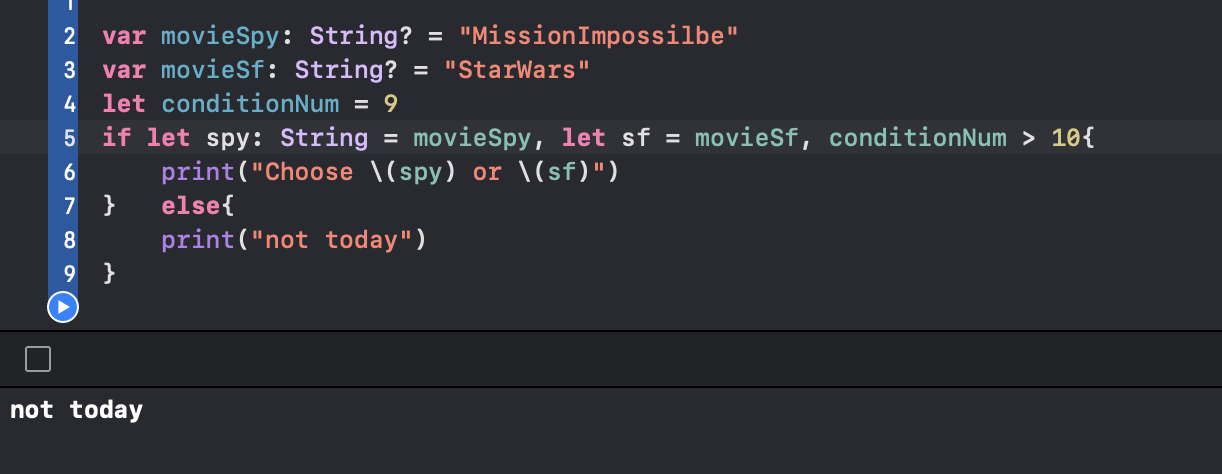
⌘You can include as many optional bindings and Boolean conditions in a single if statement as you need to, separated by commas. If any of the values in the optional bindings are nil or any Boolean condition evaluates to false, the whole if statement’s condition is considered to be false.
->하나의 if구문에 여러개의 옵셔널 바인딩과 불리언 조건을 함께 사용할 수 있다. 이 때는 곰마로 구분해야한다. 만약 어떤 옵셔널 바인딩이 nil이거나 조건문이 false가 된다면 if 실행문을 실행되지 않을 것이다.
# 3Implicitly Unwrapped Optionals
암묵적 추출 옵셔널 - 옵셔널 선언의 다른 방법.
-옵셔널이 아닌 변수나 상수에 nil을 할당하게 해줌. 이 때 해당 변수나 상수는 옵셔널임.
-암시적 추출 옵셔널로 선언되면, 일반 변수나 상수처럼 사용가능하지만, nil이 할당된 상태에서 접근하면 에러발생.
⌘Sometimes it’s clear from a program’s structure that an optional will always have a value, after that value is first set. In these cases, it’s useful to remove the need to check and unwrap the optional’s value every time it’s accessed, because it can be safely assumed to have a value all of the time.
-> 때때로 프로그램 구조상 해당 옵셔널이 항상 값을 가지는 것이 명확하다. 이러한 상황에선 해당 옵셔널을 체크하고 옵셔널 추출하는 과정을 없애는 것이 더 유용하다.
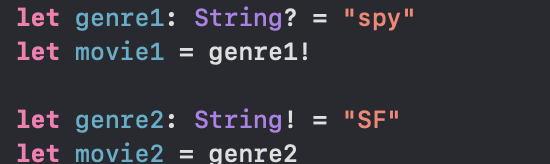
⌘These kinds of optionals are defined as implicitly unwrapped optionals. You write an implicitly unwrapped optional by placing an exclamation point (String!) rather than a question mark (String?) after the type that you want to make optional. Rather than placing an exclamation point after the optional’s name when you use it, you place an exclamation point after the optional’s type when you declare it.
-> 이러한 종류의 옵셔널은 암묵적으로 추출된 옵셔널로 정의할 수 있다. 암묵적으로 추출된 옵셔널은 느낌표를 붙여 사용한다. 옵셔널을 선언할 때 타입명 뒤에 !를 붙여 선언할 수도 있다.
⌘You can also use an implicitly unwrapped optional with optional binding, to check and unwrap its value in a single statement
-> 당연히 암묵적 추출 옵셔널도 옵셔널 바인딩에 사용할 수 있다.
=> 정리
변수나 상수를 옵셔널과 암묵적 추출 옵셔널로 선언할 수 있다. 일반 옵셔널을 사용하기 위해선 옵셔널 바인딩이나 !로 강제추출 하여 사용한다. 암묵적 추출 옵셔널은 바로 일반변수나 상수 처럼 사용할 수 있으나, nil이 할당된 상태에서 접근하려고 하면 런타임에러가 발생한다.
딕셔너리 컬렉션 타입에 대해 Key를 통해 Value를 추출하면 Optional로 반환된다. 왜냐하면 런타임 중에 해당 딕셔너리의 벨류값이 없을 수도 혹은 없어졌을 수도 있기 때문.

# 추가: 옵셔널로 이루어진 Collection Type
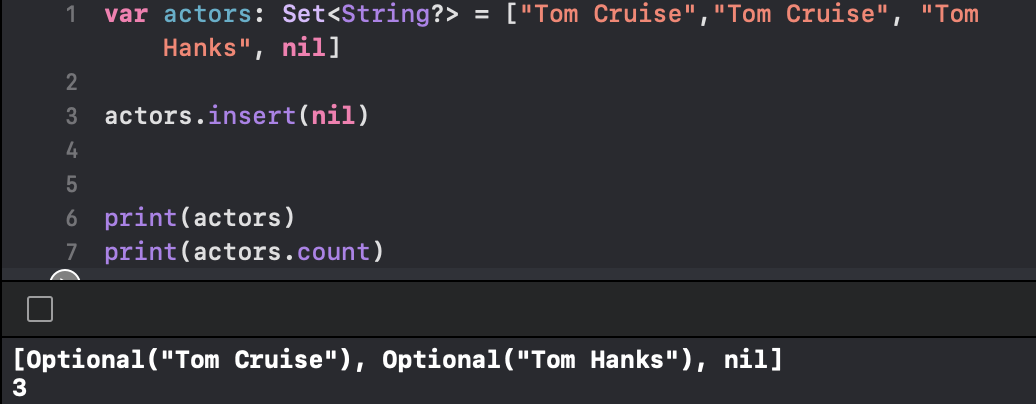
-배열을 선언할 때 원소들의 타입 옆에 ?물음표를 붙여주면, 해당 타입의 옵셔널로 이루어진 어레이와 집합을 만들 수 있다.

' IOS,Swift > Swift⌘' 카테고리의 다른 글
| Swift - Collection Type2 Dictionaries (0) | 2022.07.02 |
|---|---|
| Swift - Optional Chaining (0) | 2022.07.02 |
| Swift - Enumeration (0) | 2022.06.30 |
| Swift - Collection Type1 Array (0) | 2022.06.28 |
| Swift - Declaring Constants(let) & Variables(var) (0) | 2022.06.26 |


