Swift - Declaring Constants(let) & Variables(var)

- 다른 언어들과 다르게 스위프트에서는 변수와 상수를 명시하여 선언해주어야 함.
#0 Contants and variables
⌘Constants and variables associate a name (such as maximumNumberOfLoginAttempts or welcomeMessage) with a value of a particular type (such as the number 10 or the string "Hello"). The value of a constant can’t be changed once it’s set, whereas a variable can be set to a different value in the future.
-> 변수나 상수는 이름과 해당 타입의 값으로 이루어짐. 상수의 값은 한번 처리되면 변경할 수 없지만 변수는 후에 바뀔 수 있음.
⌘Constants and variables must be declared before they’re used. You declare constants with the let keyword and variables with the var keyword
#1 Multiple declare
⌘You can declare multiple constants or multiple variables on a single line, separated by commas

#2 Type inference
-타입추론
⌘Type-checking helps you avoid errors when you’re working with different types of values. However, this doesn’t mean that you have to specify the type of every constant and variable that you declare. If you don’t specify the type of value you need, Swift uses type inference to work out the appropriate type. Type inference enables a compiler to deduce the type of a particular expression automatically when it compiles your code, simply by examining the values you provide.
-> 타입을 명확히하는 것이 좋다. 그러나 항상 변수나 상수를 선언할 때 타입을 특정해줄 필요는 없다. 만약 타입을 특정하지 않았다면, 스위프트는 타입추론을 해줄 것이다. 컴파일러는 코드를 컴파일할 때 타입을 추정할 것이다.
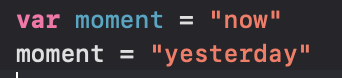
* 스위프트에선 선언과 초기화를 동시해 해주게되면, 컴파일러가 타입(형식)을 추론하여 해당 상수나 변수에 부여해줌.
* 다만 이후에 변수에 다른 타입의 값을 넣으면 에러가 발생


#3 Type Annotations
- 타입지정
⌘You can provide a type annotation when you declare a constant or variable, to be clear about the kind of values the constant or variable can store. Write a type annotation by placing a colon after the constant or variable name, followed by a space, followed by the name of the type to use.
-> 상수나 변수에 저장될 값의 타입을 명확히 해주기 위해 타입지정을 사용할 수 있다. 변수나 상수이름 뒤에 스페이스없이 콜론을 찍고 스페이스 다음 해당 타입을 적어주면 된다.
